The MeditaDream Oracle: three meditations for how you feel
Not sure which meditation to pick? Tell the Oracle how you feel, in your own words. It shuffles the deck and turns over three cards: three guided meditations chosen for this exact moment.

How does the Oracle work?
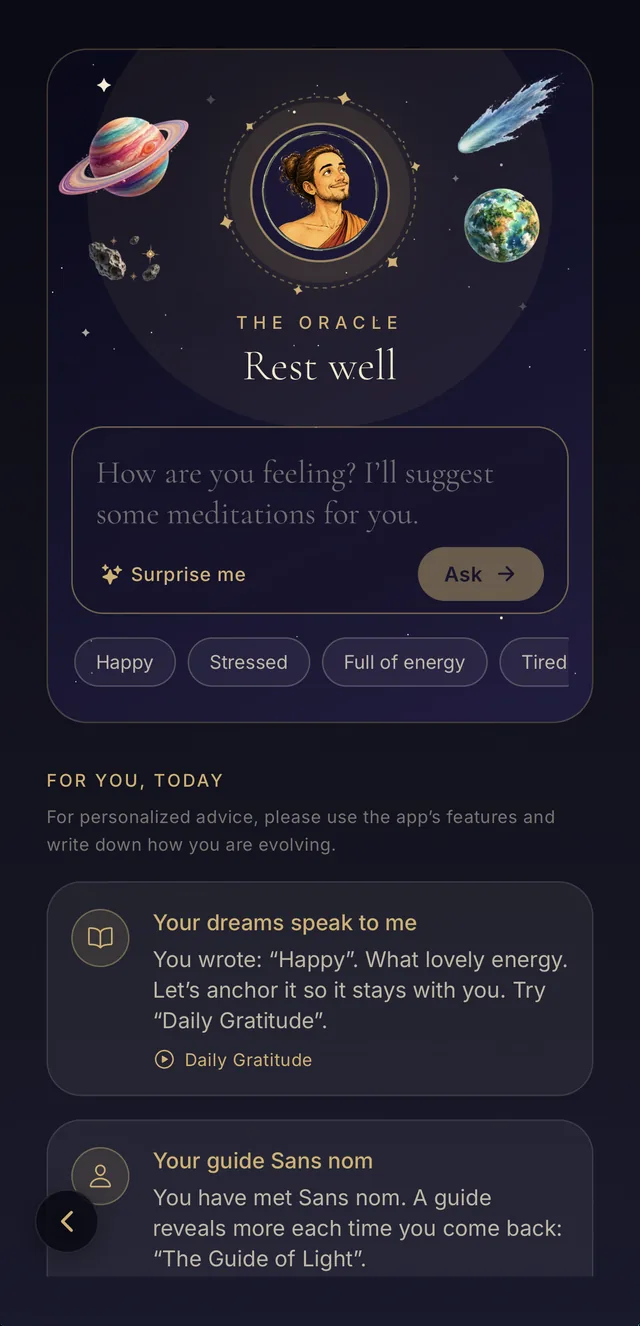
The screen asks one question: “How are you feeling?” You answer the way you would talk to a friend: “I feel anxious before a big meeting”, “I can’t sleep, my mind is racing”, “I feel lonely tonight”.
The Oracle replies with a sentence, written letter by letter, then three cards appear. Tap a card to see the meditation and its length, and start the session.
- “Surprise me” draws three meditations at random.
- Ask again as many times as you like.
- Everything happens on your phone: nothing you write is sent anywhere.
Examples: what the Oracle suggests
“I feel anxious before a big meeting”: “I can feel everything rushing. Here are three ways to slow down, right now.” Then When Everything Moves Too Fast (4 min), Finding Your Confidence Before a Challenge (4 min) and Breathing with the Whole Body (13 min).
“I can’t sleep, my mind is racing”: “Sleep comes more easily when you stop chasing it. Let yourself be carried.” Then Drifting into Sleep (16 min), Sleep Journey (27 min) and Body Asleep, Mind Awake (24 min).
“I want to explore the stars”: “Craving somewhere else? Close your eyes, the journey starts here.” Then The Unknown Planet (17 min) and two longer journeys through the galaxy and the northern lights.
Suggestions can change from one day to the next, so you keep discovering new sessions.
Daily tips that sound like you
Below the cards, the Oracle offers tips for the day. The more you use the app, the more personal they get: they draw on your journals, the reflections you note after sessions, your guides and your favorites, sometimes in your own words.
At first, when it barely knows you, it picks from nearly a hundred tips across fourteen themes: breath, sleep, gratitude, body awareness and more.
Why an oracle for meditation?
Often the hardest part is not meditating, it is choosing. Faced with so many sessions, you scroll, hesitate, then put the phone down. The Oracle turns that choice into one simple question and three answers.
It is not fortune-telling: the Oracle matches your words to meditations. Drawing cards is simply a gentle way to welcome whatever comes up.
Practice for free
Every session is in the MeditaDream app: free, no subscription, no ads, no account, and it works offline.

Frequently asked questions
Is the Oracle free?
Yes, like the whole app: no subscription, no ads, no account.
Do I need an internet connection?
Not for the cards or the tips, which are worked out on your phone. You only need a connection to download a session the first time.
What happens to what I write?
It stays on your phone. Nothing is sent or shared.
Does the Oracle replace a professional?
No. It suggests wellbeing meditations. If you are going through a hard time, talk to someone close to you or to a professional.
More themes
- 4 Minutes
- Emotional Growth
- Body, Calm & Sleep
- Sleep sounds with no ads: rain sounds, ocean waves, flutes and soft drones
- A free gratitude journal app: notice the good, one line at a time
- Your dragon companion grows as you meditate
- A dream journal and four more: your private meditation journals
- My Meditations: write your own guided meditation
- Emotional growth
- Spirit guides